
Law Firms
Law firm marketing attribution: which keyword produced the client
Legal keywords are among the most expensive clicks anywhere. Attribution for a law firm means knowing that the signed personal injury matter came from the car accident lawyer keyword in your brand campaign, not that traffic was up 12 percent last month.
14-day free trial · No credit card · Set up in 5 minutes
-
Google Ads
"car accident lawyer"
First click -
Blog post
12 days later, via search
-
Contact form
Submitted on mobile
Last click
Sarah Mitchell
New lead in your CRM
- Channel
- Paid Search
- Campaign
- pi-brand-search
- Keyword
- car accident lawyer
- Landing page
- /personal-injury
The problem
Legal keywords on Google Ads run $20 or more a click. When someone fills in your contact form, nothing tells you which campaign or keyword brought them, so you're spending tens of thousands a month and guessing which of it works.
How SourceTag helps
When someone submits your contact form, the channel, campaign, keyword and landing page are sent with their details. Your intake team sees it on the enquiry, not in a report.
What lands in your CRM
Every form submission is tagged as it is sent. Your team reads the source next to the name and the phone number.
Lead source
Channel, source, campaign and keyword. First click and last click on the same record.
Ad click IDs
gclid, fbclid, msclkid and ttclid. Match each lead back to the exact ad that created it.
Visit history
Visit count, days to conversion, device and landing page, so whoever picks up the lead knows the story before they call.
Examples for law firms
A personal injury enquiry from a Google Ads campaign targeting "accident lawyer"
A commercial law lead who found you through organic search on a blog post about employment law
A family law consultation from a referral partner's website
Channels set up by default
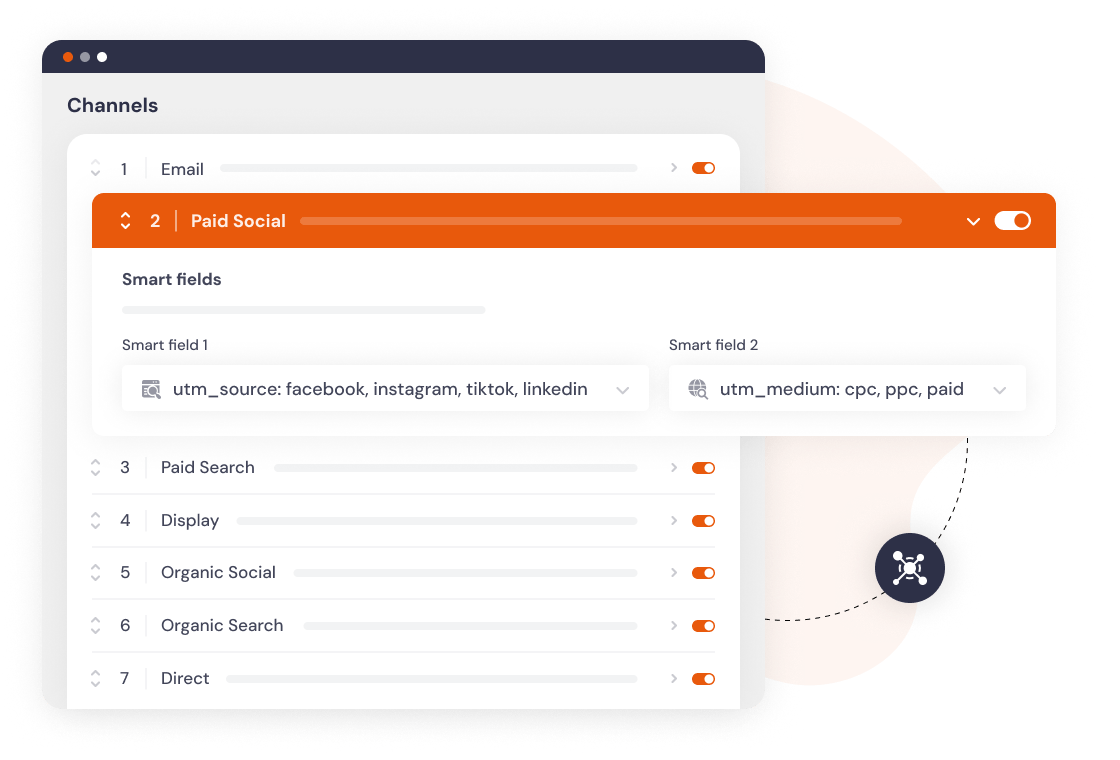
Every visit is sorted into a channel as it happens. If our channels don't match how you report, change the rules or add your own.
Set up in 5 minutes
Add the script
One line in your site header, or install the WordPress plugin.
Add hidden fields
Works with any form builder. Gravity Forms, HubSpot, Typeform and 60 more.
Every lead is tagged
Channel, campaign, keyword and landing page, wherever your forms already send data.
The gap between an enquiry and a client
Your intake form gives you a name, a phone number and a description of the matter. Google Ads gives you clicks, conversions and a cost per conversion. Nothing joins them, so the campaign that produced three signed clients and the one that produced thirty tyre-kickers look identical in the ad account.
The fix is to put the source on the enquiry itself. When the channel, campaign and keyword arrive on the intake record next to the phone number, your practice management data becomes attribution data without anyone building a report.
What you can capture on an intake form
Twelve fields always: st_fc_channel, st_fc_detail_1 through st_fc_detail_4, st_fc_landing_page, and the same six for last click. On Paid Search the detail fields hold the source, campaign, keyword and ad content, so a matter can be traced to a specific keyword in a specific campaign.
Turn on the click ID group and you also get st_fc_gclid and st_lc_gclid. Export the matters that signed, with their click IDs, and upload them to Google Ads as offline conversions. Smart Bidding then optimises toward signed clients rather than form fills, which is the difference that matters when a click costs 20 dollars.
The visitor meta group adds st_visits, st_days_to_convert and st_device. Someone who visited six times over three weeks before enquiring is a different kind of lead than someone who converted on the first click, and your intake team can see which they are before they pick up the phone.
Where the hidden fields go
If your intake form renders as an HTML form on your own domain, add hidden inputs with the SourceTag names and you are done. That covers a WordPress form plugin, a custom-built form and most embedded builders that use a JavaScript embed.
Widgets that load inside a cross-domain iframe are out of reach for the script. In that case read the values with the JavaScript API and pass them into the widget yourself.
<input type="hidden" name="st_fc_channel">
<input type="hidden" name="st_fc_detail_1">
<input type="hidden" name="st_fc_detail_2">
<input type="hidden" name="st_fc_detail_3">
<input type="hidden" name="st_fc_detail_4">
<input type="hidden" name="st_lc_channel">
<input type="hidden" name="st_lc_detail_1">
<input type="hidden" name="st_lc_detail_2">
<input type="hidden" name="st_fc_landing_page">
<input type="hidden" name="st_fc_gclid">
First click matters more in legal than almost anywhere
Someone reads your article on what to do after a crash, does nothing, and comes back eleven days later by typing your firm name into Google. Last click says Organic Search on a brand term. First click says Paid Search on the article. Cut the content and the brand searches stop too.
SourceTag keeps both on the same submission. First click is written once and never changed. Last click updates on any later visit carrying a UTM, a click ID or an external referrer.
The catch is cookie lifetime. Safari caps JavaScript cookies at seven days, and outside the EU every iOS browser runs on WebKit and does the same. Legal consideration periods are usually longer than a week, so this is not a detail you can skip. Set the cookie from a server: the WordPress plugin does it from PHP, the Cloudflare Worker does it for any site behind Cloudflare, and either gets you up to 400 days.
What this does not cover
Phone calls. A large share of legal enquiries start with a call, and a form-based tool cannot see them. You need call tracking for that, which is a separate product. Attribution on your web forms still tells you which campaigns produce form enquiries, and for most firms that is enough to reallocate budget with confidence.
Client identity is also outside the scope by design. The attribution sits in a first-party cookie on your own domain and is submitted with your own form, so matter details never reach us. We count submissions and nothing else.
Test it before you trust it
Open your site in an incognito window with a link that looks like real ad traffic, then submit the intake form with test details.
The enquiry should show First Click Channel: Paid Search, source google, campaign pi-search-brand, keyword car accident lawyer, landing page /personal-injury. Empty values arrive as (not set) rather than blank, so you can tell a captured empty field from a broken mapping. The testing guide covers checking the cookie and the hidden inputs before you submit.
https://yourfirm.com/personal-injury?utm_source=google&utm_medium=cpc
  &utm_campaign=pi-search-brand&utm_term=car+accident+lawyer&gclid=TEST123
Frequently asked questions
Connecting each enquiry back to the marketing that produced it: the channel, the campaign, the keyword and the page they landed on. Done properly it means you can say which keyword produced which signed matter, rather than which campaign produced the most form fills.
Yes, if your ads carry utm_term in the tracking template. The keyword lands in st_fc_detail_3 for first click and st_lc_detail_3 for last click, alongside the gclid.
If the form renders as an HTML form on your own site, add hidden fields with the SourceTag names and the source is submitted with the enquiry. Widgets that load inside a cross-domain iframe need the JavaScript API instead.
Yes. The channel, campaign and keyword sit on the record next to the name and phone number, so nobody has to ask how the caller heard about you.
Not covered. SourceTag tags form submissions. Calls need call tracking, which is a different tool. If most of your enquiries come by phone, treat this as attribution for the form half of your intake.